Imap Gateway
Imap Gateway can be used as a source in Adaptors to read documents from Imap accounts
The IMAP Gateway configuration allows users to define the gateway title and description and provide the required IMAP account details, including the IMAP and SMTP server addresses, email ID, password, ports, SSL option, and sender name. These settings are used to establish the connection and enable email communication through the IMAP gateway.
The Filtration Settings section allows you to filter incoming emails based on specific email addresses, subject keywords, body content, and email status.
- Email Address: Enter one or more email addresses to retrieve emails from specific senders.
- Subject Keywords: Enter keywords to filter emails based on their subject line.
- Body Keywords: Enter keywords to filter emails containing specific words in the email body.
- Email Status: Select All Emails, Unseen Emails, or Seen Emails to specify which emails should be retrieved.
- Change Email Status: Select the status to apply after the email attachment has been transferred, such as Seen, Answered, Flagged, Deleted, Draft, or Recent.
As shown in the image: The filtration is configured to retrieve Unseen Emails containing the keyword “Success” in the subject line. After the attachment is transferred, the email will be marked as Seen.
The Notification Settings section allows you to define file validation rules and configure email notifications for attachments that do not meet the specified business requirements.
- Check File Validations: Enable this option to validate incoming email attachments against the configured business rules.
- Allowed File Extensions: Specify the permitted file extensions, such as XML, to ensure that only supported file types are processed.
- Scanned Copy Validation: Enable Attached file should not be scanned copy to prevent scanned documents from being accepted.
- File Content Validation: Enter specific keywords or values that must be present in the attachment. Use
&to separate multiple required words. - Ignore Invalid Files: Enable this option to ignore attachments that do not meet the configured validation rules.
- Use Sender Email Address: Select this option to use the original sender's email address for notification emails.
- Email Recipients: Configure the To Email, CC Email IDs, and BCC Email IDs fields to specify notification recipients.
- Email Body: Customize the notification message that will be sent when an attachment fails validation.
As shown in the image: File validation is enabled, with XML specified as the allowed file extension. Scanned copies are not accepted, and attachments that fail the validation rules will be ignored. The Use sender email address option is enabled, and a notification email body is configured to inform the sender when the attachment does not comply with the defined business rules.
The above image displays the Additional settings for changing the file name section, where users can enter and add regex patterns to extract information from incoming email bodies. The extracted value is used as a prefix to the original attachment file name, with _@_ as the separator. Added patterns are displayed in the Regex Patterns table for easy management.
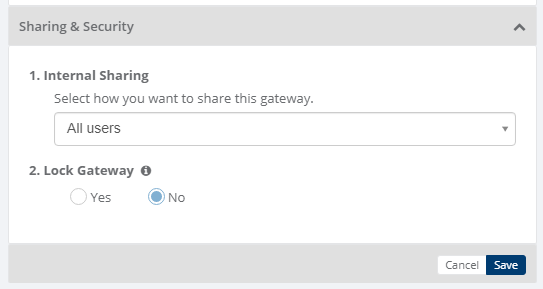
Sharing & Security
Sharing and security is used to share Gateways with other users in your subscription with lots of security features.
Below options are available for sharing and security for gateways
- Internal Sharing
- Lock Gateway
1. Internal sharing
User can share the gateway to other users using below options
- Only Me: Gateway will not be shared to any user, only that user can use the gateway
- All Users: Gateway will be shared to all the users and all the users can use the gateway
- Specific user group: You need to select some user groups so gateway will be shared to selected user groups and the users of that user groups only can use the gateway
- Only admin users: Gateway will be shared to admin users of that company
2. Lock gateway
User can lock the gateway,
- If gateway is locked, and gateway is shared to other users then other users will not be able to edit the gateway settings, they can only use the gateway
- If gateway is not locked, then other user can edit the gateway details
Category: Gateway
Last date of update: 13.10.2026
