ERP Integrations
HubBroker's ERP Integration Solution helps businesses connect their Enterprise Resource Planning (ERP) systems with e-commerce platforms, accounting applications, warehouse systems, and trading partners.
Through the HubBroker Integration Platform (iPaaS), businesses can automate the exchange of purchase orders, invoices, inventory information, customer records, and other business data without relying on repetitive manual imports and exports.
HubBroker supports integration with systems such as Microsoft Dynamics 365 Business Central, Dynamics 365 Finance & Operations, SAP Business One, Uniconta, e-conomic, Rackbeat, Shopify, OpenCart, and other supported applications.
1. Business Challenges and How HubBroker Solves Them
No. | Business Challenges | How HubBroker Solves Them |
1 | Manual Data Entry Across Systems — Businesses spend time manually entering orders, invoices, and customer information into ERP and other applications. | Automated Data Exchange — Automatically imports and exports business documents between connected systems, reducing duplicate entries and manual processing. |
2 | Disconnected Business Applications — ERP, webshops, accounting systems, and trading partners operate independently, making information difficult to exchange. | Centralized ERP Connectivity — Connects ERP systems with external applications through HubBroker iPaaS using supported APIs, SFTP, EDI, and other integration methods. |
3 | Inconsistent Data Formats and Structures — Different applications use different file formats, field names, and business data structures. | Flexible Data Mapping and Transformation — Converts and maps data between XML, CSV, JSON, EDIFACT, and other supported formats based on destination-system requirements. |
4 | Delayed Orders and Invoice Processing — Manual transfers between applications create delays in order fulfillment, invoice generation, and financial processing. | Automated Business Workflows — Transfers purchase orders, sales orders, invoices, and relevant status updates between connected systems according to configured workflows. |
5 | Inconsistent Customer, Product, and Inventory Data — Product details, customer records, and stock information may differ across ERP and connected applications. | Master Data Synchronization — Synchronizes selected customer, supplier, product, and inventory information based on configured mappings and synchronization rules. |
6 | Complex Trading Partner Integration — Connecting additional suppliers, customers, or marketplaces often requires separate integration development. | Reusable Integration Configurations — Uses predefined connectors, mappings, and configurable integration flows to simplify onboarding new trading partners. |
7 | Limited Transaction Monitoring — Businesses struggle to identify failed transfers, missing documents, and synchronization problems. | Transaction Monitoring and Error Handling — Provides transaction history, processing statuses, error information, and tools to investigate failed integrations. |
8 | Electronic Invoicing Compliance Requirements — ERP systems may not directly support the electronic document formats and networks required by trading partners or local regulations. | Peppol and EDI Connectivity — Enables ERP systems to exchange supported structured electronic invoices and business documents through configured EDI and Peppol integrations. |
These capabilities reflect HubBroker's published ERP integration and ERP API integration services.
2. ERP Integration Workflow
HubBroker follows a configurable integration process to connect ERP systems with external applications and automate business data exchange.
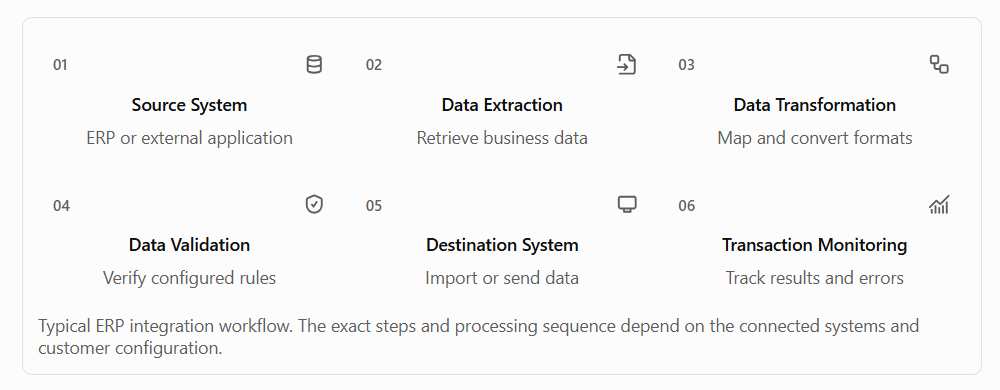
Workflow Explanation
Step | Process | Description |
1 | Source System | Identify the ERP or external application from which business data will be retrieved. |
2 | Data Extraction | Retrieve orders, invoices, products, customers, inventory, or other configured information through supported connection methods. |
3 | Data Transformation | Convert source data into the required destination format using predefined or customer-specific field mappings. |
4 | Data Validation | Validate mandatory fields, document structures, business identifiers, and configured business rules before transmission. |
5 | Destination System | Deliver the transformed data to the connected ERP, e-commerce platform, accounting application, or trading partner. |
6 | Transaction Monitoring | Monitor processing statuses, review errors, and investigate failed transactions through HubBroker iPaaS. |
3. Supported ERP and Business Application Integrations
Integration Category | Supported Examples | Common Integration Use Cases |
ERP Systems | Microsoft Dynamics 365 Business Central, Dynamics 365 Finance & Operations, SAP Business One | Sales orders, purchase orders, invoices, customer and supplier information |
Accounting Systems | e-conomic, Uniconta | Invoice exchange, customer records, accounting information |
E-Commerce Platforms | Shopify, OpenCart, BigCommerce | Webshop orders, product information, inventory synchronization |
Inventory and Warehouse Systems | Rackbeat and supported warehouse applications | Product master data, warehouse information, stock updates |
Trading Partner Networks | EDI and Peppol, B2BRouter | Electronic invoices, orders, order confirmations, and other supported documents exchange |
4. Key Benefits of ERP Integration
- Reduced Manual Processing: Automatically exchange business data instead of repeatedly entering information in multiple applications.
- Improved Data Accuracy: Use mappings and validation rules to reduce inconsistencies between connected systems.
- Faster Business Operations: Streamline order processing, invoicing, and inventory updates.
- Flexible Connectivity: Integrate ERP systems using supported APIs, EDI, SFTP, and other connection methods.
- Scalable Integration: Extend existing workflows to support additional applications and trading partners.
- Better Transaction Visibility: Track successful and failed transactions through centralized integration monitoring.
Category: Solutions with HubBroker iPaaS
Last date of update: 19.10.2026
