EDI Integration & Trading Partner Connectivity

Electronic Data Interchange (EDI) is the automated exchange of business documents between organizations using structured electronic formats.
EDI enables businesses to exchange purchase orders, invoices, order confirmations, shipping notices, credit notes, and other business documents directly between their systems without manually entering or emailing information.
For example, when a customer sends an electronic purchase order, EDI allows the supplier to receive and process the order automatically in its ERP system.
HubBroker EDI Integration Solution
HubBroker provides a centralized EDI integration solution that enables businesses to exchange electronic documents with customers, suppliers, retailers, logistics providers, and other trading partners.
Through the HubBroker Integration Platform (iPaaS), customers can connect their ERP and business applications to supported EDI networks, transform documents into the required formats, validate business information, and monitor document exchanges.
HubBroker's EDI solution helps businesses to:
- Automate incoming and outgoing business document exchange.
- Connect ERP, accounting, e-commerce, and warehouse systems.
- Exchange documents in trading partner-specific EDI formats.
- Validate document structure, mandatory fields, and business rules.
- Connect with trading partners through supported EDI networks and communication protocols.
- Track document delivery, acknowledgements, processing errors, and transaction history.
- Reduce manual data entry and improve business process efficiency.
1. EDI Trading Partner Connectivity
HubBroker enables businesses to exchange electronic documents with their customers, suppliers, and other trading partners using supported EDI networks and communication methods.
Each trading partner may have different requirements, such as document formats, identifiers, communication protocols, or validation rules.
HubBroker helps configure these requirements and establish the appropriate connection between the sending and receiving systems.
Trading Partner Configuration
The following information is typically required when configuring an EDI trading partner.
Configuration | Description |
Trading Partner Details | Customer or supplier name and relevant business information. |
Partner Identifier | EDI identifier, GLN, Peppol Participant ID, or another supported business identifier. |
Document Types | Invoices, orders, order responses, dispatch advice, or other agreed business documents. |
Document Format | EDIFACT, XML, Peppol BIS, or another supported format. |
Connection Method | Peppol, AS2, SFTP, FTP, FTPS, API, or another supported exchange method. |
Mapping Requirements | Required fields, product codes, business identifiers, and partner-specific data structures. |
Validation Rules | Mandatory fields, document structure, and customer-specific business requirements. |
2. Supported EDI Documents
HubBroker supports the automated exchange of common business documents used in sales, procurement, invoicing, and logistics processes.
Document Type | Description |
Purchase Order | Electronic order sent by a buyer to request products or services from a supplier. |
Order Response / Confirmation | Confirms acceptance, rejection, or changes to a received purchase order. |
Invoice | Electronic invoice issued for supplied products or services. |
Credit Note | Electronic document used to adjust or credit a previously issued invoice. |
Dispatch Advice / Shipping Notice | Provides information about goods that have been dispatched or are scheduled for delivery. |
Other EDI Documents | Additional business document types supported according to trading partner requirements. |
3. EDI Format Transformation and Mapping
Different ERP systems and trading partners may use different document formats and data structures.
HubBroker provides mapping and transformation capabilities to convert incoming and outgoing business documents into the format required by the destination system.
Supported Formats and Standards
Format / Standard | Description |
EDIFACT | International EDI standard commonly used for exchanging orders, invoices, and logistics documents. |
Peppol BIS | Standardized business document specifications used for electronic document exchange through Peppol. |
OIOUBL | Danish XML-based business document format. |
OIOXML | Legacy Danish XML-based electronic business document format. |
EHF | Norwegian electronic business document format and specifications. |
HUBXML | HubBroker-specific XML format used in configured integration and transformation workflows. |
XML | Structured data format commonly used for ERP integrations and electronic documents. |
CSV | Tabular data format used for importing and exporting business information. |
JSON | Structured data format commonly used for API-based integrations. |
How Data Transformation Works
Source Document → Data Mapping & Transformation → Required EDI Format → Trading Partner
For example:
A supplier generates an invoice in XML format from its ERP system. HubBroker receives the document, maps the required fields, transforms the data into the customer's requested EDIFACT invoice format, and sends it through the configured EDI connection.
Where configured, HubBroker can also extract information from PDF documents and transform the extracted data into structured electronic formats.
4. Supported EDI Networks and Communication Methods
HubBroker supports multiple EDI connectivity options to help businesses exchange documents with trading partners.
Network / Method | Purpose |
Peppol | Exchanges supported electronic business documents through the Peppol network. |
NemHandel | Supports electronic document exchange within Denmark's e-invoicing ecosystem. |
VANS Networks | Enables document exchange through supported Value Added Network Service providers and interconnections. |
AS2 | Secure point-to-point document exchange using AS2 communication. |
SFTP | Secure file transfer between connected systems and trading partners. |
FTP / FTPS | File-based document exchange where supported and agreed with the trading partner. |
API | Integrates ERP and business applications through supported API endpoints. |
The appropriate network or communication method is selected based on the trading partner's requirements and the customer's integration setup.
5. EDI Document Validation
HubBroker provides configurable validation capabilities to check electronic business documents before they are processed or delivered.
Validation helps identify missing information, incorrect document structures, and other business rule violations.
Common Validation Areas
Validation Type | Description |
Document Structure | Checks whether the document follows the configured format or schema. |
Mandatory Fields | Verifies required information such as document numbers, dates, and business identifiers. |
Sender and Receiver Details | Checks configured sender and receiver identification requirements. |
Business Rules | Applies customer-specific or trading partner-specific validation requirements. |
Product and Item Data | Validates configured item codes, quantities, and related information. |
Invoice Information | Checks required invoice fields, totals, tax information, and references according to configured rules. |
Documents that fail validation can be flagged for investigation or correction before further processing.
6. Transaction Monitoring and Error Handling
HubBroker iPaaS provides transaction monitoring capabilities to help customers track the processing of electronic business documents.
Customers can review document processing information, investigate failed transactions, and identify errors associated with EDI exchanges.
Monitoring Capabilities
- View incoming and outgoing transaction history.
- Review document processing statuses.
- Identify failed or rejected documents.
- Review available validation errors and processing messages.
- Access original and transformed documents where available.
- Track acknowledgements and delivery information when supported by the connection.
- Investigate document processing issues through available transaction history.
How EDI Connectivity Works
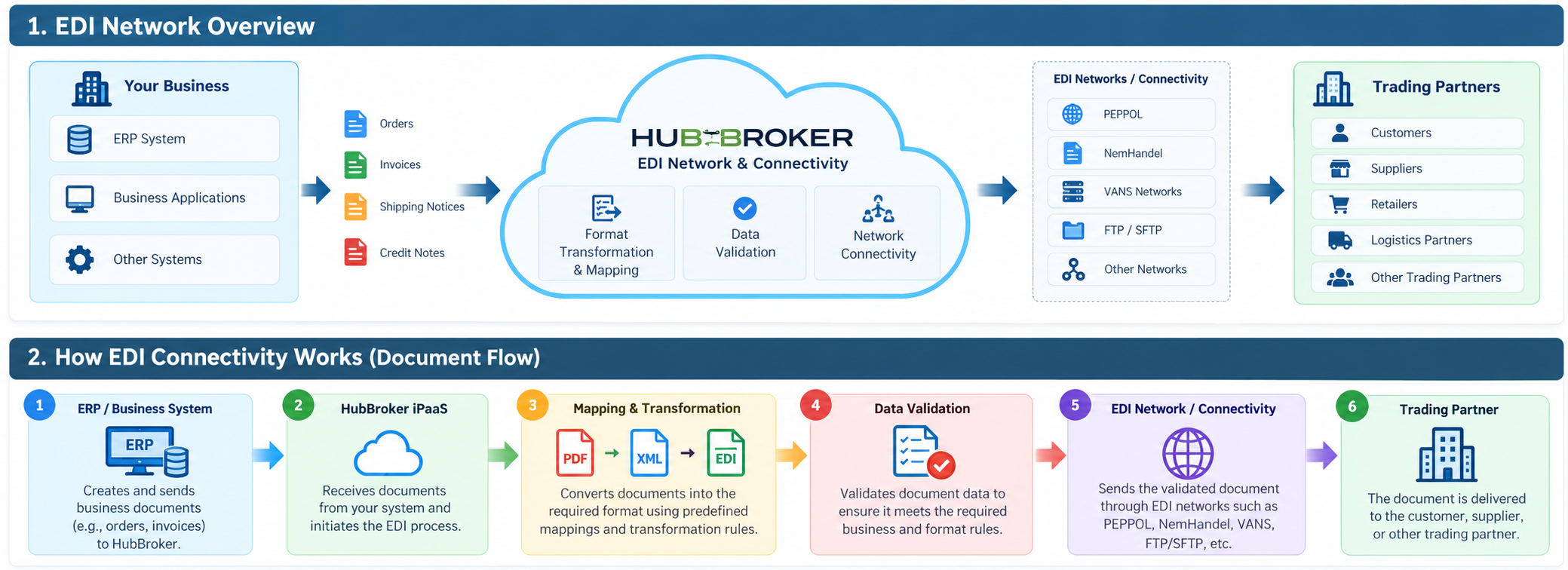
A typical document flow through HubBroker can be represented as:
Your ERP / Business System↓HubBroker iPaaS↓Mapping & Format Transformation↓Validation↓EDI Network / VANS / PEPPOL↓Trading Partner
This automated process reduces manual document handling and enables faster and more consistent document exchange.
Key Benefits
Large Trading Partner Network - Connect with a large network of Danish and international trading partners.
Automated Document Exchange - Exchange business documents between systems without manual processing.
Multiple Formats & Standards - Support different formats and standards required by trading partners.
Format Transformation - Convert documents into the format required by the receiving system.
ERP Connectivity - Connect EDI processes with ERP and business systems. The provided EDI document specifically describes ERP connectivity as a key benefit.
Reduced Errors and Costs - Automation reduces manual data entry, errors, and document-processing effort.
Scalable Cloud Platform - HubBroker iPaaS provides a scalable platform that can adapt as business and trading-partner requirements grow.
Category: EDI Network & Connectivity
Last date of update: 21.10.2026
